
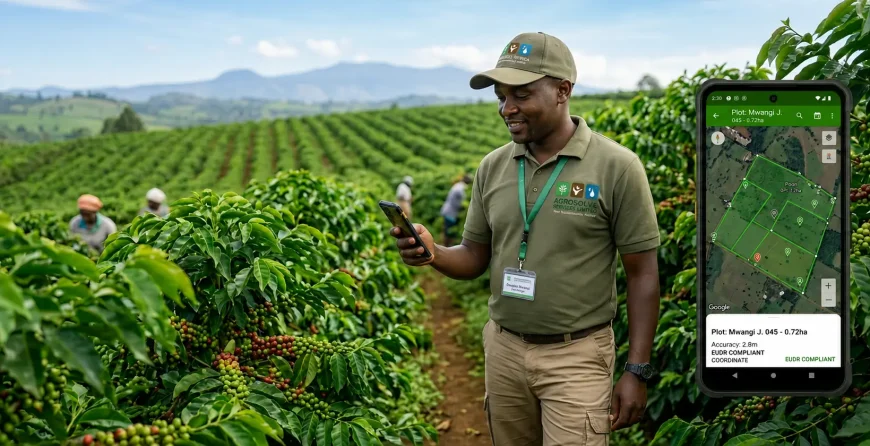
EUDR GPS Geolocation for Kenyan Coffee Cooperatives — The Complete Tool-by-Tool Guide 2026
📋 Standard: EU Deforestation Regulation (EUDR) — Regulation (EU) 2023/1115 | ⚠️ Deadline: December 2026 | ☕ Applies to: All Kenyan coffee cooperative EU exporters | 🛰 Topic: GPS geolocation tools & TRACES NT submission | 📖 Read time: 18 minutes | 📅 Published: May 2026
⚠️ December 2026 — Less Than 7 Months to Collect Geolocation Data for Every Member Plot
A 200-member cooperative with 300 plots needs 10–14 weeks for GPS data collection, validation, and TRACES NT setup. You are reading this in May 2026. If you have not started, start today. Every week of delay narrows the window between successful compliance and permanent loss of EU market access. Contact us for immediate support →
In This Guide
- What Geolocation Data EUDR Actually Requires
- Polygon vs GPS Point — Which Do You Need?
- Tool Comparison — KoboToolbox vs ODK vs Survey123 vs Garmin
- KoboToolbox — Step-by-Step Setup
- ODK Collect — When and How to Use It
- Garmin GPS Devices — For Non-Smartphone Zones
- Field Collection Protocol — Step by Step
- WGS84 and Data Standards
- Validating Against Forest Cover Maps
- What to Do If a Plot Overlaps Forest Cover
- TRACES NT — Registration and Submission
- Handling Members Without Smartphones
- Implementation Timeline — Week by Week
- What EUDR Geolocation Costs in Kenya 2026
- Frequently Asked Questions
⚡ Key Facts — EUDR Geolocation for Kenyan Coffee Cooperatives
- EUDR requires GPS coordinates for every member farm plot that contributed coffee to any EU-bound export lot — not just a random sample, not just the largest farms. Every plot. Every member. No exceptions.
- GPS point collection is legally sufficient for most Kenyan smallholder plots. The majority of Kenyan coffee plots are under 4 hectares — the EU guidance threshold below which a single GPS point plus area declaration satisfies EUDR geolocation requirements. You do not need to walk every plot boundary to meet the December 2026 deadline.
- KoboToolbox is free, offline, and widely supported in Kenya. It is the recommended starting tool for most cooperatives — zero cost, GPS polygon collection supported, GeoJSON export for TRACES NT, Swahili UI available.
- 10–14 weeks from planning to first TRACES NT submission for a 100–300 member cooperative with a trained field team. Starting May 2026 gives you adequate margin. Starting October 2026 does not.
- TRACES NT registration must happen now. EU Login account activation and TRACES NT Operator registration can take weeks. Register at traces.ec.europa.eu today — do not wait until collection is complete.
- EUDR geolocation costs less than 1% of annual EU export revenue for most Kenyan coffee cooperatives. Not complying costs 100% of EU export revenue, permanently, from December 2026.
Every Kenyan coffee cooperative that exports to EU buyers faces the same operational challenge: by December 2026, every plot of land that contributed coffee to any EU-bound export lot must have GPS geolocation data on file — documented in a format the EU’s TRACES NT platform can process and verify against satellite deforestation maps. The principle is clear. The execution is where cooperative managers run into questions that the EU regulation documents and even Kenya’s EUDR guidance materials do not answer for their specific situation.
Which app do you use? How do you handle members who don’t own smartphones? What exactly is a polygon and how do you collect one? What is WGS84 and why does it matter? How do you get your data into TRACES NT? What happens if one of your member plots appears to sit on forest cover? This guide answers every one of these questions — with specific tools, field protocols, and a week-by-week implementation timeline built for Kenyan coffee cooperative conditions.
This is a companion guide to our complete EUDR Kenya guide for coffee exporters — which covers what EUDR requires, the full compliance framework, and the 5-step implementation timeline. This guide focuses entirely on the geolocation data collection operational challenge.
📩 Free: EUDR Geolocation Data Collection Checklist for Kenyan Cooperatives — straight to your inbox
Every step from member plot mapping through GPS collection, data validation, and TRACES NT submission — formatted as a print-and-use field checklist designed for Kenyan coffee cooperative conditions. Free, instant delivery.
The Financial Argument That Leaves No Room for Debate
EUDR geolocation compliance: less than 1% of annual EU export revenue.
Non-compliance from December 2026: 100% of EU export revenue. Permanently.
This is not a close call.
A 100-member Kenyan coffee cooperative exporting 50 tonnes of AA grade coffee to EU specialty buyers at USD 4.00–7.00/kg generates annual EU export revenue of USD 200,000–350,000. The cost of EUDR geolocation compliance — KES 205,000–420,000 (approximately USD 1,600–3,200) — represents less than 1% of that annual revenue. It is also a once-completed investment: GPS coordinates for member plots do not expire and do not need to be recollected each year. The cost of losing EU market access entirely is 100% of EU export revenue, every year, from December 2026 onward. Every week of delay in starting the geolocation programme is a week of unnecessary risk to your cooperative’s most valuable commercial relationship.
What Geolocation Data EUDR Actually Requires from Kenyan Cooperatives
Before choosing a tool or collecting a single GPS coordinate, it is critical to understand exactly what the EU Deforestation Regulation requires. Article 9 of Regulation (EU) 2023/1115 requires that due diligence statements include “the geolocation of all plots of land where the relevant commodities were produced, including the geographical coordinates of the relevant plots of land.” Where a commodity was produced on multiple plots, the coordinates of all plots must be included.
For Kenyan coffee cooperatives, this translates to a specific operational requirement: for every export lot prepared for an EU buyer, you must be able to show GPS coordinates for every member farm plot whose coffee was included in that lot. If you cannot produce this data, you cannot submit a valid due diligence statement. Without a valid DDS, your coffee shipment cannot enter the EU from December 2026.
| EUDR Concept | What It Means for a Kenyan Coffee Cooperative | Practical Implication |
|---|---|---|
| Plot of land | Each contiguous parcel of land where coffee is grown by a member farmer. One member may have multiple separate plots. | Each separate plot needs its own GPS data. Member with 3 plots = 3 sets of coordinates. |
| Geolocation (polygon preferred) | GPS boundary trace of the plot perimeter — a polygon showing exactly where the plot starts and ends. | Collect by walking the plot boundary with a GPS-enabled device. Minimum 4 waypoints for a basic polygon. |
| GPS point (alternative for plots <4 ha) | A single GPS coordinate plus an area declaration in hectares. Accepted for plots under 4 hectares under EU guidance. | Most Kenyan smallholder coffee plots are under 4 ha. GPS point + area declaration is legally sufficient. |
| WGS84 decimal degrees | The coordinate reference system TRACES NT uses. e.g., Murang’a Town: -0.7667, 37.1500 (not degrees-minutes-seconds). | All collection apps must output WGS84 decimal degrees. This is the default in KoboToolbox, ODK Collect, and Garmin devices. |
| December 31, 2020 cut-off | The plot must have been under coffee cultivation (not forest) on this date. You need current GPS data plus evidence of land use status on this date. | Collect current GPS now. Evidence of 2020 land use: older satellite imagery, land title records, member declarations. |
📖 Also read: EUDR Compliance for Kenyan Coffee Exporters — Complete Guide to the December 2026 Deadline — covers the full EUDR due diligence framework, the 5-step compliance timeline, and what happens if your cooperative is not compliant by the deadline. · Rainforest Alliance Certification Kenya — the complementary sustainability certification most EU specialty coffee buyers require alongside EUDR compliance.
Polygon vs GPS Point — Which Does Your Cooperative Need to Collect?
The Critical Clarification That Makes EUDR Compliance Achievable by December 2026
GPS point + area declaration = legally sufficient for plots under 4 hectares.
Most Kenyan smallholder coffee plots are under 4 hectares.
You do not need to walk every plot boundary to meet the December 2026 deadline.
This is the single most important technical clarification for Kenyan cooperative managers who are worried that EUDR geolocation requires a full boundary walk of every member’s plot. It does not. EU guidance explicitly accepts a GPS point (single latitude/longitude coordinate) plus a self-declared plot area in hectares for plots under 4 hectares — which covers the vast majority of Kenyan smallholder coffee farms. A trained field collector can collect a GPS point + area declaration in 5–10 minutes per plot. Polygon collection takes 15–45 minutes per plot. For a 300-plot cooperative, the difference is 6 field days (GPS points) vs 30+ field days (full polygons). Start with GPS points. Upgrade to polygons for at-risk plots after validation.
However, polygon collection is still strongly recommended even for plots below 4 hectares for two reasons: polygon data provides stronger deforestation verification when EU authorities cross-check your DDS against forest cover maps; and several EU buyers are already requesting polygon data as a condition of supply. Collecting polygon data now protects you from having to redo the collection programme later.
| Data Type | Time per Plot | Equipment | EUDR Compliance | Recommended For |
|---|---|---|---|---|
| GPS Point | 2–5 min per plot | Any GPS smartphone | ✅ Sufficient for plots <4 ha | Phase 1 for all cooperatives under time pressure. Large cooperatives (200+ members). |
| GPS Polygon | 15–45 min per plot | GPS smartphone + KoboToolbox/ODK, or Garmin GPSMAP | ✅ Strongest compliance; required for plots >4 ha | All plots if time allows; at-risk deforestation plots; buyer preference. |
Practical recommendation: begin with GPS point collection for all member plots immediately to meet the December 2026 deadline. Where time and capacity allow, conduct polygon collection for plots flagged by preliminary deforestation screening. This phased approach delivers compliance by the deadline while building towards the stronger polygon dataset buyers increasingly require.
Tool Comparison — KoboToolbox vs ODK Collect vs Survey123 vs Garmin GPS
Four tools dominate the EUDR geolocation data collection landscape for East African smallholder supply chains. The right choice for your cooperative depends on technical capacity, connectivity, budget, and smartphone availability.
| Tool | Cost | Works Offline | Polygon | Exports GeoJSON | Best For | Not Ideal For |
|---|---|---|---|---|---|---|
| KoboToolbox ⭐ | Free | ✅ | ✅ | ✅ | Most Kenyan cooperatives. Easiest setup. Widely supported by NGOs/development orgs in Kenya. Swahili UI. | Very large datasets (>5,000 submissions on free tier) |
| ODK Collect | Free | ✅ | ✅ | ✅ | Cooperatives with technical staff. More customisable. Better for large member datasets. | Cooperatives without a technically capable data manager |
| Survey123 (Esri) | Free basic / Paid full | ✅ | ✅ | ✅ | Cooperatives already using ArcGIS ecosystem. Best visualisation tools. | Cooperatives without existing Esri relationship |
| Garmin GPSMAP 64s/66s | KES 35,000–55,000 | ✅ (dedicated) | ✅ (Track log) | ✅ (GPX/KML) | Poor mobile coverage zones. Most accurate (±3m). Remote highlands (Kirinyaga North, Mathioya). | Primary tool where smartphone coverage is good — high cost per device |
| Google Maps | Free | ❌ | ❌ | ❌ | Orientation and navigation only | NOT suitable for EUDR data collection |
KoboToolbox — Complete Step-by-Step Setup for Kenyan Coffee Cooperatives
KoboToolbox is used by FAO, USAID, WFP, and dozens of NGOs operating in Kenya — which means local support expertise is available and field staff with development sector experience are likely already familiar with it.
Step 1 — Create your cooperative’s KoboToolbox account
Go to kf.kobotoolbox.org. Click “Create an account.” Use a cooperative institutional email address — not a personal Gmail — so the account remains with the organisation. Select “Non-profit / NGO / Research” as your account type for the free humanitarian tier with higher submission limits. No credit card required.
Step 2 — Build your EUDR data collection form
In KoboToolbox, create a new form. Your EUDR geolocation form needs these fields at minimum:
- Member ID — your cooperative’s internal member number
- Member Name
- Plot Name/Number — each member’s plot identifier
- Plot Area (hectares) — decimal number
- GPS Point — GPS question type, “Point” mode. Set accuracy threshold to 5 metres or better.
- GPS Polygon — GPS question type, “Polygon/Trace” mode. Set as optional for phase 1 GPS point collection.
- Land Use Declaration — select_one: “Coffee since before December 31, 2020” / “Converted from other use after December 31, 2020” / “Not sure — requires investigation”
- Collector Name and Collection Date — for quality control and audit trail
In GPS question settings, verify the coordinate system is WGS84 decimal degrees (the KoboToolbox default — confirm it has not been changed). Set GPS accuracy threshold to 5 metres.
Step 3 — Deploy to KoboCollect on field team phones
Download KoboCollect from Google Play Store on each field team Android phone. Log in with the cooperative’s KoboToolbox credentials. Configure for offline use — enable “Offline mode” and pre-download all pending forms before field teams leave areas with mobile coverage.
Step 4 — Export and format for TRACES NT
Export collected data as GeoJSON (for polygon data — directly uploadable to TRACES NT) or CSV (for GPS point data — convert to GeoJSON using the free CSV to GeoJSON converter at csvjson.com/csv2geojson before uploading to TRACES NT). Agrosocial Services provides data conversion support if this step presents a technical barrier.
📖 Also read: GLOBALG.A.P. Group Certification for Kenyan Cooperatives — the QMS data management systems established for GLOBALG.A.P. group certification create the member registry and plot mapping infrastructure that directly support an EUDR geolocation programme. If your cooperative is pursuing both, the investments are complementary and should be integrated from the start.
ODK Collect — When and How to Use It
ODK Collect is the underlying technology behind KoboToolbox — KoboToolbox is essentially a managed, user-friendly deployment of the ODK framework. ODK Collect as a standalone tool is preferable over KoboToolbox in two scenarios:
- Very large cooperatives (500+ members) where KoboToolbox’s free tier submission limits may be reached — ODK Central (the server component) can be self-hosted for unlimited submissions at approximately KES 2,000–5,000 per month on a cloud provider.
- Cooperatives with an existing NGO technical support partner who already manages ODK infrastructure — adding EUDR data collection to an existing ODK server avoids creating a parallel KoboToolbox account.
The form design, field collection protocol, and data export process for ODK Collect are identical to KoboToolbox — both use the XLSForm standard. If you have used KoboToolbox before, you can use ODK Collect without additional training.
Garmin GPS Devices — For Non-Smartphone Zones and High-Accuracy Requirements
In highland coffee growing zones with poor mobile coverage — particularly Kirinyaga North, Mathioya (Murang’a), upper Kangema, and parts of Taita Hills — smartphone GPS accuracy degrades significantly due to the absence of assisted GPS. A dedicated GPS unit provides 3–5 metre accuracy consistently, regardless of mobile coverage.
The Garmin GPSMAP 64s or 66s are the recommended dedicated GPS units for Kenyan EUDR geolocation fieldwork. Both models support polygon trace collection via the track log function, export data as GPX and KML files (TRACES NT-compatible after minor conversion), and operate on AA batteries — practical for multi-day field campaigns in areas without reliable electricity.
Garmin setup for EUDR polygon collection: enable the Track Log function before entering each plot. Walk the plot boundary at a consistent pace. When you return to the starting point, save the track with the member ID and plot number as the track name. Export all saved tracks to a computer via USB at the end of each field day. Convert GPX to GeoJSON using GPS Visualizer (gpsvisualizer.com) or QGIS before TRACES NT upload.
Garmin units are available in Kenya from authorised dealers including Rongo Navigation Equipment and online via Jumia Kenya. Budget KES 35,000–55,000 per unit.
Field Collection Protocol — What Your Team Must Do on Every Plot Visit
Inconsistent field protocols are the primary source of EUDR geolocation data quality problems. The following protocol must be followed on every plot visit, by every field collector, without exception.
For GPS Point Collection
- Walk to the centre of the plot — not the entrance, not the nearest road. The GPS reading must represent the plot, not the path to the plot.
- Open KoboCollect and navigate to the GPS Point question. Tap “Record Location.” Wait for GPS accuracy to reach 5 metres or better — do not accept readings above 10 metres.
- Hold the phone horizontally, at arm’s length from your body. Your body mass blocks satellite signals. Standing under dense coffee canopy reduces accuracy — take the reading in an open area within the plot where possible.
- Wait a minimum of 30 seconds after accuracy reads 5m or better before tapping “Save.” This allows the GPS chip to average multiple satellite readings for a more accurate final coordinate.
- Confirm Plot ID and Member ID match the plot you are physically standing in before moving on. Cross-reference with the paper member register.
For GPS Polygon Collection
- Start at a clearly identifiable plot corner (fence post, large rock, pathway junction). Record a 5-second minimum at this starting waypoint.
- Walk the plot perimeter clockwise at approximately 3 km/h. KoboCollect polygon mode records waypoints automatically; Garmin track log records continuously.
- Pause for 5 seconds at each corner point to allow accurate position recording at the directional change. Moving through corners at full walking speed produces inaccurate corner coordinates.
- Return to the starting corner and close the polygon. In KoboCollect, tap “Close Polygon.” In Garmin, stop the track log and save with the plot identifier as the track name.
- Review the polygon on screen before leaving the plot. If the shape is clearly wrong — crossed lines, sharp spikes, shape that does not match the physical plot — delete the record and repeat.
Non-negotiable quality rule: every plot that is visited must have a completed form submission before the field collector moves on. Do not collect paper notes to enter later. Do not trust memory for plot IDs or member names. Every piece of data enters the app before the collector leaves the plot — this is the audit trail that EUDR due diligence requires.
WGS84 and Data Standards — Why the Coordinate System Matters
WGS84 (World Geodetic System 1984) is the coordinate reference system used by GPS satellites, Google Maps, TRACES NT, and virtually every global mapping application. It represents locations as latitude and longitude in decimal degrees — for example, Murang’a Town is at approximately -0.7667° latitude, 37.1500° longitude in WGS84. TRACES NT only accepts coordinates in this format.
If your GPS device or app collects data in a different coordinate system — such as UTM or degrees-minutes-seconds — your data must be converted before submission. Errors in coordinate system conversion produce incorrect plot locations that may place a plot kilometres from its actual position, triggering false-positive deforestation flags.
- KoboToolbox: WGS84 decimal degrees is the default. No action required.
- ODK Collect: WGS84 decimal degrees is the default. Verify in Settings → GPS.
- Garmin GPSMAP 64s/66s: go to Setup → Units → Position Format → hddd.ddddd° (decimal degrees). Also confirm Map Datum is set to WGS84 in Setup → Units.
- Garmin GPX/KML exports: always in WGS84. No conversion needed.
Validating Your Data Against Forest Cover Maps
After GPS data collection, every cooperative must validate its plot data against satellite-based forest cover maps to identify any plots that may be located in or adjacent to deforested areas. This validation step is what the EU will perform when it assesses your due diligence statements — doing it yourself first means you discover and resolve issues before they become compliance failures.
Free Validation Tools for Kenyan Cooperatives
- Google Earth Pro (free desktop application): import your GPS data as a KML file. Use the historical imagery feature to view each plot in satellite imagery from 2020 — if the plot was clearly under coffee cultivation at that date, it passes the basic deforestation check. Free to download, does not require mobile data once imagery is cached.
- Global Forest Watch (globalforestwatch.org): the authoritative deforestation monitoring platform the EU references in its EUDR risk assessment guidance. Upload your KML or GeoJSON plot data and overlay against the Hansen/UMD Tree Cover Loss layer. Any plot showing tree cover loss after December 31, 2020, within or adjacent to the plot boundary requires further investigation. Free, web-based.
- QGIS (free GIS software, qgis.org): for cooperatives with a technically capable data manager, QGIS allows bulk validation of all member plots simultaneously against downloaded forest cover raster layers — producing a formal spatial analysis report that can accompany your TRACES NT submission as supporting documentation. FAO Kenya office has Swahili training videos for QGIS on YouTube.
What to Do If a Member Plot Overlaps with Forest Cover
This is the most commercially serious scenario in the EUDR geolocation process — and the most important reason to complete validation well before the December 2026 deadline.
Three Scenarios and Their Responses
- GPS collection error — the most common cause. The point was recorded at the wrong location (collector was outside the plot, or a coordinate format error shifted the position). Verify against the paper member register and revisit the plot for re-collection. Not an EUDR compliance issue — a straightforwardly correctable data quality issue.
- Shade trees within the coffee agroforestry system — many Kenyan highland coffee farms use shade trees (Grevillea, Calliandra, Leucaena) within the plot. Tree cover detection algorithms may flag shade-tree coffee plots as having “tree cover” — but this is not deforestation. Document the shade tree species and coffee intercropping system in the plot’s land use declaration. EU guidance explicitly excludes agroforestry from EUDR deforestation classification.
- Genuine post-2020 deforestation — if a member’s plot was genuinely cleared from forest after December 31, 2020, that plot cannot be included in EU-destined export lots under EUDR. Notify the member, segregate cherry purchases from that member from EU-destined lots, and document the segregation process for TRACES NT. The member’s plots can still contribute to domestic market or non-EU export lots. This scenario is expected to affect a small minority of Kenyan coffee cooperative members.
⚠️ Why early validation matters — the timeline advantage
A cooperative that discovers a genuine deforestation issue in June 2026 has 6 months to investigate, document the segregation process, and adjust its EU export lot allocation system before the December deadline. A cooperative that discovers the same issue in November 2026 has weeks. Early validation gives your cooperative agency over the outcome.
TRACES NT — How Kenyan Coffee Cooperatives Register and Submit Due Diligence Statements
The December 2026 Deadline Is Achievable — But Only If You Start Now
10–14 weeks from planning to first TRACES NT submission.
Starting in May 2026 = comfortable margin.
Starting in September 2026 = no margin for complications.
The December 2026 EUDR deadline is not impossibly close — but it requires action now, not later. A 200-member cooperative with a trained field team of 3–4 collectors can complete GPS point collection in 4–8 weeks, data validation in 2–3 weeks, and TRACES NT first DDS submission in 1–2 weeks. That is 10–14 weeks from planning to compliance — entirely achievable from May 2026. But complications arise: collectors get sick, plot boundaries are disputed, TRACES NT registration has queries, some members cannot be reached. These complications consume the margin that early starters have and late starters do not. TRACES NT registration in particular must start today — EU Login account activation takes days and TRACES NT operator registration can take a further week. Register now, not when your GPS data collection is complete.
TRACES NT (Trade Control and Expert System — New Technology) is the European Commission’s official EUDR due diligence statement submission platform at traces.ec.europa.eu. Every operator placing EUDR-regulated commodities on the EU market must submit a DDS through TRACES NT before each shipment.
TRACES NT Registration Process for Kenyan Cooperatives
- Create an EU Login account at ecas.ec.europa.eu using a cooperative institutional email address. Verification takes 24–48 hours.
- Log into TRACES NT at traces.ec.europa.eu using your EU Login credentials.
- Register as an Operator. Provide: legal cooperative name, Kenya address (matching KRA registration), country (Kenya), commodity type (Coffee — HS code 0901 or 0902). Registration is free. You receive a TRACES NT Operator ID — keep this reference number.
- For each export shipment, create a Due Diligence Statement (DDS) linking your specific export lot to the geolocation data of contributing farm plots. Upload GeoJSON or KML coordinates directly, or enter manually for small cooperatives.
Practical TRACES NT Tips
- Register immediately. EU Login account activation and TRACES NT Operator registration can take several weeks if queries arise from the Commission’s system.
- Your EU buyer may offer to submit the DDS on your behalf as the importer — confirm this in writing. Even if your buyer handles submission, you are responsible for providing accurate geolocation data.
- The DDS reference number must accompany the shipment before the coffee departs Kenya — it travels with the commercial invoice and phytosanitary certificate.
- Upload GeoJSON for polygon data. TRACES NT accepts GeoJSON directly. Convert CSV GPS point data to GeoJSON using csvjson.com/csv2geojson before uploading.
Note on broader certification compatibility: EUDR due diligence documentation overlaps significantly with ethical trade audit requirements. If your EU buyer also requires a SMETA (Sedex Members Ethical Trade Audit), the supply chain traceability documentation your cooperative builds for EUDR — member plot registers, lot-to-plot linkage records, land use declarations — directly supports SMETA’s supply chain mapping requirements. Build your EUDR and SMETA documentation systems together where possible.
📖 Also read: EUDR Compliance for Kenyan Coffee Exporters — Complete Guide — covers the full DDS framework, due diligence assessment requirements, and what your EU importer needs from you beyond geolocation data. · SMETA Audit Kenya — ethical trade audit requirements for Kenyan export farms and cooperatives supplying UK and EU buyers with SEDEX membership requirements.
Handling Members Without Smartphones — Practical Solutions for Kenyan Cooperatives
Smartphone penetration among Kenyan smallholder coffee farmers ranges from 40–70% depending on county and altitude zone. A cooperative cannot make EUDR GPS data collection conditional on members owning a smartphone.
| Scenario | Solution | Cost | Notes |
|---|---|---|---|
| Member has no smartphone | Trained cooperative field collector visits plot with cooperative-owned smartphone or Garmin device | KES 12,000–25,000 per cooperative smartphone | Member must be present to confirm plot boundaries |
| Member has smartphone but no data connectivity | Use KoboCollect or ODK in offline mode — data syncs when collector returns to a WiFi or mobile data zone | No additional cost | Ensure full charge before field day and sync data daily |
| Remote zone with no mobile coverage at all | Garmin GPSMAP dedicated unit — no mobile signal required at any stage | KES 35,000–55,000 per unit | Transfer data to computer via USB when returning to town |
| Member is elderly or unable to participate | Cooperative field officer collects GPS data with member’s written or verbal consent, and a signed consent form | Consent form template — no cost | Consent form provides EUDR audit trail confirming the plot owner authorised data collection |
Your EUDR Geolocation Implementation Timeline — Week by Week
The following timeline applies to a typical Kenyan coffee cooperative with 100–300 members. Starting in May 2026 gives adequate margin for the December 2026 deadline. Starting in September 2026 does not.
| Weeks | Phase | Key Actions | Output |
|---|---|---|---|
| Weeks 1–2 (NOW) | Planning & Setup | Compile master member plot register; create KoboToolbox/ODK account; build EUDR form; purchase/allocate field devices; register for EU Login and TRACES NT | Complete member plot list; deployed KoboCollect app; TRACES NT Operator ID |
| Weeks 3–4 | Field Team Training | Train 3–4 field collectors; practice runs on 10–15 known plots; validate practice data in Google Earth Pro; brief all members | Trained field team; validated test data; members informed |
| Weeks 5–12 | Data Collection | Systematic field collection (15–25 plots per collector per day); daily data sync and quality spot-check; weekly progress review; flag poor GPS accuracy plots for revisit | GPS data for 95%+ of member plots |
| Weeks 13–14 | Data Validation | Export all data as GeoJSON/KML; overlay against Global Forest Watch deforestation layer; flag and investigate forest cover overlaps; revisit GPS collection errors | Validated, clean dataset; list of plots requiring investigation |
| Weeks 15–16 | TRACES NT First DDS | Complete TRACES NT operator profile; prepare first Due Diligence Statement for next export lot; coordinate DDS reference number with exporter; brief EU buyer on compliance status | First DDS submitted; EU buyer notified of compliance |
| Week 17+ | Ongoing Operations | Submit DDS for every EU-destined export lot; add new member plots as membership grows; annual data review against updated forest cover layers | Continuous EUDR compliance |
What EUDR Geolocation Costs in Kenya 2026 — Full Budget Breakdown
| Cost Item | Small Coop (50–100 members) | Medium Coop (100–300 members) | Large Coop (300–500 members) |
|---|---|---|---|
| KoboToolbox / ODK setup | Free | Free | KES 0–15,000 (ODK Central hosting) |
| GPS-enabled smartphones (cooperative-owned, 2–6 devices) | KES 25,000–50,000 | KES 50,000–100,000 | KES 75,000–150,000 |
| Garmin GPS devices (if needed for remote zones) | KES 0–45,000 | KES 45,000–90,000 | KES 90,000–180,000 |
| Field collector daily costs (transport, allowances) | KES 15,000–30,000 | KES 30,000–80,000 | KES 80,000–150,000 |
| Data validation and TRACES NT setup (consultant support) | KES 50,000–90,000 | KES 80,000–150,000 | KES 120,000–250,000 |
| Total estimated (with consultant support) | KES 90,000–215,000 | KES 205,000–420,000 | KES 365,000–745,000 |
A 100-member Kenyan coffee cooperative exporting 50 tonnes of AA grade coffee to EU specialty buyers at USD 4.00–7.00/kg generates annual EU export revenue of USD 200,000–350,000. The EUDR geolocation cost (KES 205,000–420,000 — approximately USD 1,600–3,200) represents less than 1% of that annual revenue. It is also a once-completed investment — GPS coordinates do not expire and do not need to be recollected each year. The cost of losing EU market access is 100% of EU export revenue, permanently. The investment case requires no further analysis.
📦 Certification Tools That Support Your EUDR Documentation
The Farm Records Starter Pack includes member plot register templates, land use declaration forms, GPS data collection tracking sheets, and due diligence documentation frameworks compatible with the EUDR geolocation workflow. The Complete Starter Kit includes these plus the full export market access guide and funding proposal template.
Agrosocial Services — EUDR Geolocation Support for Kenyan Coffee Cooperatives
End-to-End EUDR Geolocation Support — From Planning to TRACES NT First Submission
Agrosocial Services provides complete EUDR geolocation support for Kenyan coffee cooperatives: member plot mapping, KoboToolbox/ODK system setup and form design, field collector training, GPS data collection management, validation against Global Forest Watch, TRACES NT registration and first DDS submission. We work with coffee cooperatives across Kirinyaga, Murang’a, Taita Taveta, Embu, Meru, and all Kenyan coffee producing counties.
Frequently Asked Questions
What GPS data does EUDR require from Kenyan coffee cooperatives?
GPS coordinates for every member farm plot that contributed coffee to an EU-destined export lot. EUDR prefers polygon data but accepts a GPS point + area declaration (hectares) for plots under 4 hectares — the majority of Kenyan smallholder plots. All coordinates must be in WGS84 decimal degree format. Submitted via a Due Diligence Statement on TRACES NT before each EU shipment. Full framework: EUDR Kenya Coffee Exporters Guide.
What is the best free GPS tool for EUDR data collection in Kenya?
KoboToolbox — free, offline-capable, polygon collection supported, exports GeoJSON and KML for TRACES NT, Swahili UI, widely supported by development organisations in Kenya. Install KoboCollect from Google Play Store. ODK Collect is the equally capable alternative for cooperatives with technical staff. Google Maps is not suitable — cannot export coordinates in TRACES NT-compatible format.
What is TRACES NT and how do Kenyan cooperatives register?
TRACES NT is the EU’s official EUDR due diligence statement portal at traces.ec.europa.eu. Register by creating an EU Login account at ecas.ec.europa.eu, then register as an Operator on TRACES NT (cooperative legal name, Kenya address, HS code 0901 for coffee). Free registration. Takes 1–5 days. Register immediately — do not wait until GPS collection is complete. Your EU buyer may submit DDS on your behalf — confirm this in writing.
What is a polygon vs GPS point — and which does my cooperative need?
GPS point = single coordinate. Polygon = coordinates tracing plot boundary. For plots under 4 hectares (most Kenyan smallholder coffee plots), GPS point + area declaration is legally sufficient. Polygon is preferred for stronger deforestation verification and increasingly required by EU buyers. Practical recommendation: collect GPS points for all plots first to meet the December 2026 deadline, then upgrade at-risk plots to polygon. Full comparison table in the “Polygon vs GPS Point” section above.
How long does it take to collect GPS data for a 200-member cooperative?
4–8 weeks field collection (trained team of 3–4 collectors) + 2–3 weeks validation and TRACES NT setup = 10–14 weeks total from planning to first DDS submission. Starting May 2026 gives comfortable margin for December deadline. Starting October 2026 gives no margin for complications. Detailed week-by-week timeline is in the Implementation Timeline section above.
What if a member plot overlaps with forest cover on satellite maps?
Three scenarios: GPS collection error (revisit and recollect — most common); shade trees within a coffee agroforestry system (document shade species — not EUDR deforestation); genuine post-2020 deforestation (plot cannot enter EU export lots — segregate from EU batches and document in TRACES NT). Most Kenyan highland coffee plots fall under scenario 1 or 2. Validate all plots against Global Forest Watch before DDS submission. Full guidance in the “Forest Overlap” section above.
What does EUDR geolocation cost for a Kenyan coffee cooperative?
Small (50–100 members): KES 90,000–215,000. Medium (100–300 members): KES 205,000–420,000. Large (300–500 members): KES 365,000–745,000 with consultant support. Less than 1% of annual EU export revenue for most cooperatives. A once-completed investment — GPS coordinates are permanent. Full cost breakdown table in the “Costs” section above. Contact us for a specific quotation →
Can I use Google Maps for EUDR data collection?
No. Google Maps cannot export GPS coordinates in GeoJSON or KML format for TRACES NT. It requires mobile data at collection time (unlike KoboToolbox/ODK which work offline). Coordinates manually copied from Google Maps are error-prone. Use KoboToolbox or ODK Collect for data collection. Use Google Earth Pro (free) for validation — it accepts KML imports and allows satellite imagery overlay.
Key Takeaways — EUDR GPS Geolocation for Kenyan Coffee Cooperatives
- GPS point collection is legally sufficient for most Kenyan smallholder plots (under 4 hectares). You do not need to walk every plot boundary to meet the December 2026 deadline. Collect GPS points now, upgrade to polygons for at-risk plots after validation.
- KoboToolbox is free, offline, and the recommended starting tool for most Kenyan coffee cooperatives. Zero cost. Works without mobile data in highland zones. Exports GeoJSON directly for TRACES NT. Install KoboCollect from Google Play Store today.
- TRACES NT registration must start immediately. EU Login account activation and Operator registration can take weeks. Register at traces.ec.europa.eu now — before GPS collection even begins.
- The December 2026 deadline is achievable — but only if you start now. A 200-member cooperative needs 10–14 weeks from planning to first DDS submission. Starting in May 2026 gives comfortable margin. Starting in September 2026 gives no margin for complications.
- EUDR geolocation costs less than 1% of annual EU export revenue for most cooperatives — and is a once-completed permanent investment. Non-compliance costs 100% of EU export revenue, permanently, from December 2026.
- Forest cover overlaps are mostly GPS collection errors or shade tree agroforestry — not genuine deforestation issues. Validate all plots against Global Forest Watch before DDS submission. Early validation gives you time to investigate and resolve borderline plots.
- Non-smartphone members are fully solvable. Cooperative-owned devices, offline app modes, dedicated Garmin units for remote zones, and signed consent forms for collectors visiting plots on behalf of elderly members — all standard solutions that leave no member unaddressed.
- WGS84 decimal degrees is the required coordinate format for TRACES NT. All tools in this guide default to WGS84. Verify before collecting. Coordinate system errors are the most common cause of incorrect plot location data that fails EUDR deforestation verification.
Ready to Start Your EUDR Geolocation Programme?
Contact us for end-to-end geolocation support, download the Farm Records Pack to start building your member plot register, or get the Complete Starter Kit for the full certification and compliance package.
Related Resources — EUDR Compliance and Coffee Export for Kenyan Cooperatives
EUDR and compliance: EUDR Kenya Coffee Exporters — Complete Compliance Guide · Rainforest Alliance Certification Kenya · SMETA Audit Kenya · GRASP Certification Kenya · Kenya GAP Certification
Group certification and records: GLOBALG.A.P. Group Certification — Kenya Cooperatives · Farm Record Keeping for GLOBALG.A.P. Certification · GLOBALG.A.P. Certification Kenya · Certification Cost Kenya 2026
County coffee resources: Agricultural Consultant Kirinyaga — AA Coffee & EUDR · Agricultural Consultant Murang’a — Coffee & EUDR · Agricultural Consultant Taita Taveta — Cloud Forest Coffee · Agricultural Consultant Embu · Agricultural Consultant Meru
Market access: Agricultural Export Kenya — Complete Guide 2026 · China Duty-Free Access 2026 · MPS-ABC Certification Kenya
Downloads: Complete Starter Kit (KES 6,000) · Farm Records Pack (KES 500) · Proposal Writing Template (KES 2,000)
External tools & resources: KoboToolbox (free) · TRACES NT (EU portal) · Global Forest Watch · QGIS (free GIS) · EU Login registration